



52cm Flower Ceiling Fan Light with Remote, 3-Color Dimmable LED, 3 Speeds & Night Light
SKU
People are viewing right now
Flower-Shaped Ceiling Fan Light – User Manual
(Model: White, 52cm, 40W LED, Remote & Wall Control)
---
Key Features
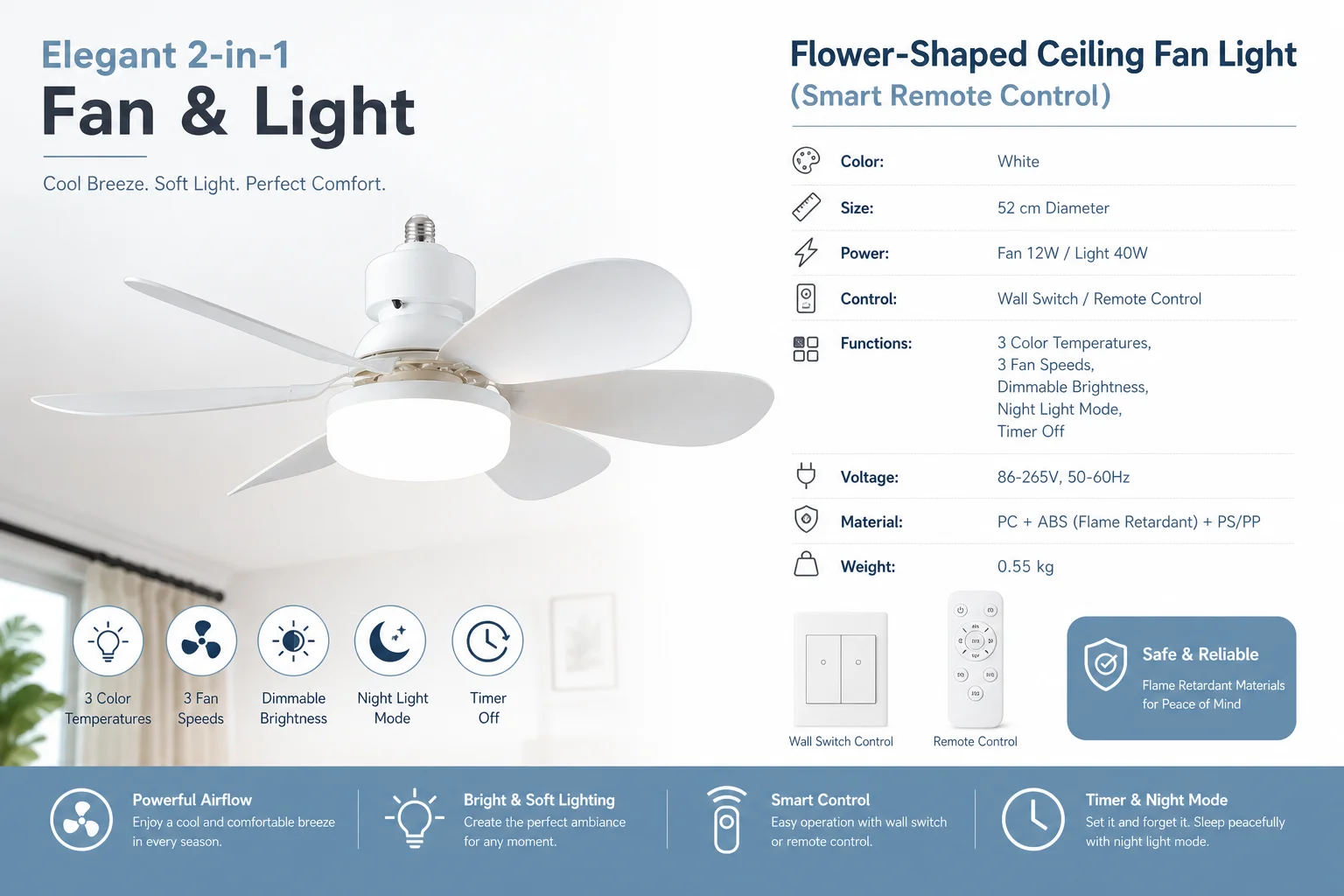
· 3-Color Dimming – Easily switch between three light colors (warm, neutral, white) to suit any mood.
· 3 Fan Speeds – Low, medium, and high speed settings for year-round use.
· Adjustable Brightness – Stepless brightness control from soft to full brightness.
· Night Light Mode – Ultra-soft illumination, perfect for nighttime without glare.
· Timer Off – Set the fan/light to turn off automatically after a chosen time.
· Dual Control – Operate by regular wall switch or the included remote control.
---
Specifications
Item Details
Style Flower-shaped ceiling fan with light
Size Diameter 52 cm, Height 18.5 cm
Weight 0.55 kg
Material PC + ABS (flame retardant) + PS/PP
Power Fan: 12 W / LED Light: 40 W
Voltage 86–265 V, 50/60 Hz (wide voltage)
Control Wall switch / Remote control
Main Functions 3-color light, 3 fan speeds, brightness adjustment, night light, timer
---
How to Use
1. Installation – Must be installed by a qualified electrician. Make sure the power is completely off before wiring.
2. Wall Switch Control – Click the wall switch to cycle through light colors or fan speeds, depending on the wiring mode.
3. Remote Control:
· Light Button – Press to switch between three color temperatures or turn the light on/off.
· Fan Button – Press to cycle fan speeds: Low → Medium → High → Off.
· Brightness Button – Press and hold to adjust brightness smoothly.
· Night Light Button – Activate the gentle night light mode.
· Timer Button – Set the auto-off timer as desired.
---
Safety Notes
· Always disconnect the power supply before installation, cleaning, or maintenance.
· Keep hands and objects away from spinning fan blades.
· Clean only with a dry, soft cloth. Do not use water or liquid cleaners directly on the unit.
· If the remote will not be used for a long time, remove the batteries to prevent leakage.
(Model: White, 52cm, 40W LED, Remote & Wall Control)
---
Key Features
· 3-Color Dimming – Easily switch between three light colors (warm, neutral, white) to suit any mood.
· 3 Fan Speeds – Low, medium, and high speed settings for year-round use.
· Adjustable Brightness – Stepless brightness control from soft to full brightness.
· Night Light Mode – Ultra-soft illumination, perfect for nighttime without glare.
· Timer Off – Set the fan/light to turn off automatically after a chosen time.
· Dual Control – Operate by regular wall switch or the included remote control.
---
Specifications
Item Details
Style Flower-shaped ceiling fan with light
Size Diameter 52 cm, Height 18.5 cm
Weight 0.55 kg
Material PC + ABS (flame retardant) + PS/PP
Power Fan: 12 W / LED Light: 40 W
Voltage 86–265 V, 50/60 Hz (wide voltage)
Control Wall switch / Remote control
Main Functions 3-color light, 3 fan speeds, brightness adjustment, night light, timer
---
How to Use
1. Installation – Must be installed by a qualified electrician. Make sure the power is completely off before wiring.
2. Wall Switch Control – Click the wall switch to cycle through light colors or fan speeds, depending on the wiring mode.
3. Remote Control:
· Light Button – Press to switch between three color temperatures or turn the light on/off.
· Fan Button – Press to cycle fan speeds: Low → Medium → High → Off.
· Brightness Button – Press and hold to adjust brightness smoothly.
· Night Light Button – Activate the gentle night light mode.
· Timer Button – Set the auto-off timer as desired.
---
Safety Notes
· Always disconnect the power supply before installation, cleaning, or maintenance.
· Keep hands and objects away from spinning fan blades.
· Clean only with a dry, soft cloth. Do not use water or liquid cleaners directly on the unit.
· If the remote will not be used for a long time, remove the batteries to prevent leakage.


Related products


Frequently Bought Together
No frequently bought products found!
Products from this Seller
View All





Trusted & Reliable Global B2B & B2C Marketplace

SMART TRADE HUNT is a global B2B & B2C marketplace connecting buyers, sellers, businesses and service providers worldwide. Discover products, services and opportunities across multiple categories in one marketplace.
Subscribe to our newsletter for regular updates about Offers, Coupons & more




Share with Friends
Trading is more effective when you share products with friends!Share you link
Share to